

How many times did you have to search the manual for how to do something in Ejecutiva? Or did you receive calls and messages from students asking about course dates and times? These are situations we know well and that we know take up your valuable time.
That’s why we worked on these two game-changing functionalities: an artificial intelligence assistant that answers all your operational questions in seconds, available whenever you need it, and integration with Google Calendar so students can schedule their courses automatically. The result: fewer interruptions, more autonomy, and much smoother management for everyone.
AI Assistant to Resolve Questions Instantly
You now have an artificial intelligence assistant integrated into the Ejecutiva user manual. It’s available to help you with any questions about how the platform works and remind you of the necessary steps in different processes.
Some examples of queries:
- First steps to set up your manager
- How to load a performance cycle
- How to load your company profiles
- The necessary steps to create a course and its editions
The goal is for you to find quick answers without interrupting your work, giving you more autonomy in daily management.
Google Calendar Integration
We simplified student organization with the new option to automatically schedule courses in Google Calendar.
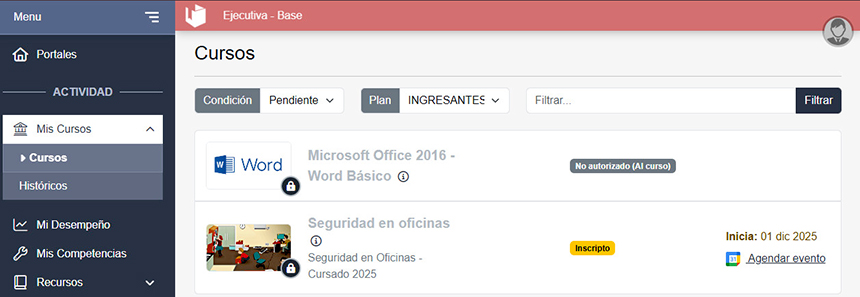
In My courses > Courses, you’ll find the “Schedule event” link next to the Google Calendar icon. With a single click, an event is created in the student’s calendar with all the course details.
The link appears only when the start date of the edition is after the current date.
This functionality reduces inquiries about dates and times, making the experience easier for participants.