

We’ve added a set of improvements to your campus, all pointing in the same direction: making the platform simpler, faster, and easier to manage with fewer clicks. These tweaks show up in different places —user management, plans, reports, notices, integrations— but they share a common goal: taking repetitive work off your plate and keeping what you actually need in plain sight on every screen. Here’s what changed.
🌐 A campus that speaks your language
The campus is now available in 18 languages and variants, and each person can choose their own in just two clicks from the header, to the right of their profile picture. This is an especially useful improvement for institutions with audiences across different regions or countries.
🔗 Integration with external tools (LTI 1.3 standard)
The campus supports the LTI version 1.3 standard, which lets you connect external tools and use them inside the classroom as just another resource. Integrations are set up from the Integrations menu and then become available so teachers and administrators can add them to their units as LTI Resources.
📊 Clearer Advanced Reports
We’ve revamped Advanced Reports with a new card-based dashboard that groups the different reports into common categories, so you can find the one you’re looking for at a glance. We also reviewed the names and descriptions to make them more representative of what each report shows, so you don’t have to open them to know what’s inside.
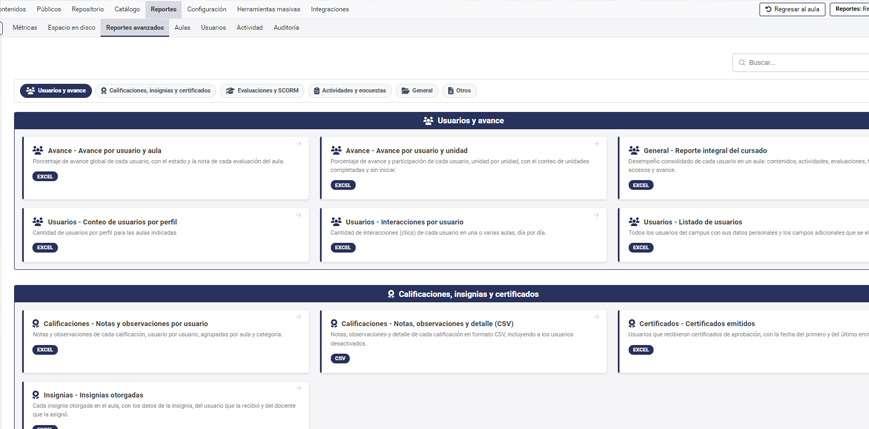
The new Advanced Reports dashboard: each report is grouped into cards by category.
🗂️ Plans, easier to organize and find
We worked on Plans on three fronts. Now, in the classroom selection dropdown, classrooms are shown grouped by Plan whenever the user exists in at least one classroom associated with a plan, which tidies up the view when there are many classrooms in play. We also added a classroom filter by status —activated, deactivated, or all— which defaults to the value set in the “Filter by classroom status” parameter under Settings › General. And we added a search for plans and classrooms within the plans screen, which displays all matches grouped together.
👥 User management and bulk tools
The screen for adding users now includes a classroom filter by status —activated, deactivated, or all— so you can work on the set you care about without distractions. We also added a new bulk tool for activating tutors and coordinators, which handles in a single operation what used to require going case by case. And in Copy/Move users we added a classroom search and a checkbox to also show deactivated classrooms.
📣 Follow-up notices, more tailored to you
When you copy follow-up notices, a checkbox now lets you select all classrooms at once. And on the screen that lists classrooms within Notice Copy, we added the filter by classroom status, so you can narrow the list down to what you need.
🔎 A more complete search and filters in Offers
Search behavior has improved and now also takes into account the Program items inside the Units, so searches return more complete results. In Offer Management, we also added a filter to search for classrooms within catalog offers.
🧾 Receipts for students
In Activities and Assessments we added a link that lets students generate and download a receipt of the activities they’ve submitted and the assessments they’ve completed. A simple record of their journey through the classroom, right at hand.
We invite you to explore these new features in your campus. As always, your feedback helps us keep improving the platform. ✨