
Campus Virtual:
Unit Navigator Update (teacher view)
- Status indicators: Icons now reflect the current state of each unit:
- Closed
- Prerequisite (requires completing previous units)
- Closed with scheduled automatic opening
- Block design: Unit block backgrounds change color based on content type:
- Blue: The unit block background displays in blue (muted) when the unit has no mandatory content.
- Red: The unit block background displays in red (muted) when the unit has at least one mandatory content item.
- Green: Green background icons are shown to student users when they have completed all mandatory items in that unit (and blue background if the unit only had optional items).
Improvements to the Program Module
- Pending content calculation:
- The progress disk now includes all pending content, including items in inaccessible units (closed or prerequisite).
- Visual differentiation:
- Red: Pending content in accessible units.
- Gray: Pending content in locked units.
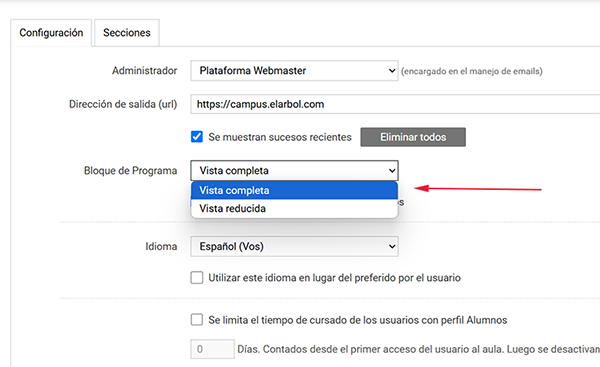
- Display flexibility:
- Users can toggle between a full view of the Program block or the compact view (similar to the previous version). In the classroom settings you’ll find the block display option. By default it shows expanded.
New Webservice: Classification Fields Management
- **Method:**
asignar_valores_clasificacion - Features
- Create new classification fields for classrooms along with their initial values.
- Add additional values to existing classification fields.
PLATAFORMA EJECUTIVA
General interface improvements: Implementation of quick access bar to Desktop
- All menus available on the Desktop screen are now accessible through direct shortcuts on the home page.
- Customizable display system:
- Compact Mode: Minimalist display with icons only.
- Extended Mode: Full display with icons and descriptive labels.
Training Module Redesign: Comprehensive interface update
- New visual layout on the main Training screen.
- Complete redesign of the Desktop-Training view with improvements in:
- Content organization
- Navigation experience
- Visual accessibility
Performance Management Module Optimization: New dynamic editing functionality
- Greater flexibility in competency management:
- Ability to deactivate competencies in active cycles.
- Available exclusively during the following phases:
- Initial planning
- Continuous monitoring
Remember that updates to our products are included in your subscription. They’re at no additional cost!