

Optimize your course management with a comprehensive, attractive and automated catalog.

A well-structured course catalog not only improves the student experience; it also expands your reach, professionalizes your offering and saves you time at every stage of the process. This tool is designed so you can promote, manage and sell your training proposals more efficiently, all from one place.
You’ll be able to present your courses with style, including images, attractive descriptions and organization by categories that makes navigation easier. Plus, your students can enroll autonomously, from any device and at any time, without the need for manual intervention.
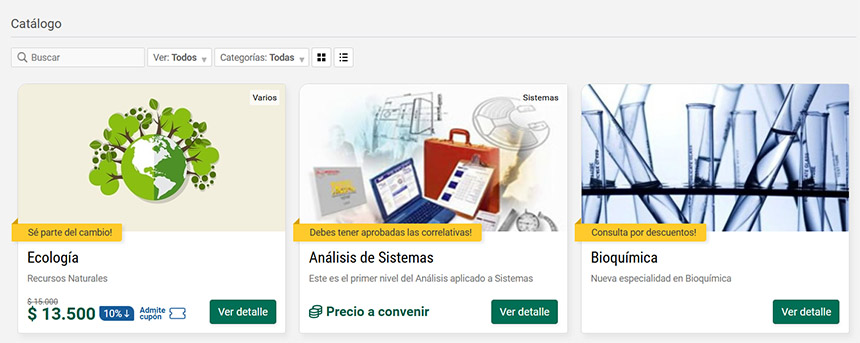
Whether you offer free or paid courses, open to the public or with exclusive access, the platform adapts to your strategy. It even allows you to integrate multiple payment methods such as MercadoPago, PayPal and other digital wallets, so you can charge the way you prefer.
You have full control at every stage:
- You can set deadline dates, establish quotas, require prior approval for enrollments, choose whether classroom access will be immediate or scheduled and automate certificate delivery.
- If your courses are paid and you want to boost your proposals even more, you’ll be able to assign custom prices, apply limited-time discounts and offer promotional coupons to different user profiles.
Steps to create a successful offering @keyframes fadeIn { from { opacity: 0; } to { opacity: 1; } } @keyframes slideIn { from { transform: translateX(-50px); opacity: 0; } to { transform: translateX(0); opacity: 1; } } @keyframes pulse { 0% { transform: scale(1); } 50% { transform: scale(1.05); } 100% { transform: scale(1); } } .paso { animation: fadeIn 0.8s ease-out forwards, slideIn 0.8s ease-out forwards; opacity: 0; } .paso1 { animation-delay: 0.2s; } .paso2 { animation-delay: 1.0s; } .paso3 { animation-delay: 1.8s; } .paso4 { animation-delay: 2.6s; } .paso5 { animation-delay: 3.4s; } .subpaso { animation: fadeIn 0.5s ease-out forwards; opacity: 0; } .subpaso1 { animation-delay: 4.0s; } .subpaso2 { animation-delay: 4.3s; } .subpaso3 { animation-delay: 4.6s; } .subpaso4 { animation-delay: 4.9s; } .subpaso5 { animation-delay: 5.2s; } .icon { animation: pulse 2s infinite ease-in-out; transform-origin: center; } .icon1 { animation-delay: 0.2s; } .icon2 { animation-delay: 1.0s; } .icon3 { animation-delay: 1.8s; } .icon4 { animation-delay: 2.6s; } .icon5 { animation-delay: 3.4s; } 1 Define your proposal Program, target audience, duration, cost, quota, start dates, certification 2 Create the virtual classroom Configure the classroom and upload initial materials for self-enrollment 3 Design or select images For the catalog and when entering the offering 4 Define the promotional text To promote and explain the proposal 5 Upload to the catalog section a. Select create a new offering b. Select the classroom you’ve defined c. Upload the images and texts d. Define dates, quotas and cost if applicable e. Decide whether this offering will be visible in the catalog or shared by link only
Imagine spending less time on administrative tasks and more on the quality of your content. Visualize an enrollment process that works 24 hours a day, while your students enjoy a professional experience from the first contact.