

Learning is not just about receiving information: it is about making arguments, listening to different positions and building alongside others. The campus offers two spaces for that horizontal building —the forum and the debate— which look very similar on the surface and are easily confused. But they follow different paths, and choosing well changes the whole experience of a course.
In online learning, a learner's written word matters just as much as a teacher's. When someone backs up a position, reads a classmate who thinks differently and reshapes their own idea, they are doing something no material can do for them: they are learning to make an argument. Horizontal exchange spaces are where that happens, where knowledge does not come down from the front of the room but is built among peers, with the teacher's moderation as scaffolding.
That is why choosing between a forum and a debate is not a technical configuration detail: it is a pedagogical decision about how the word will circulate in your classroom.
✦What really matters
Before choosing the tool, think about the prompt. Forum or debate, the space alone does not guarantee an exchange: what sparks the conversation is a good prompt, one that poses a real dilemma, anchors in experience and asks you to read others before you write. With a weak prompt, even the best forum fizzles out; with a good one, either space comes to life.
The underlying difference
The confusion is understandable: both are asynchronous conversations where learners post and reply to one another. And the difference is not simply that a debate can be graded. The structural difference is that a debate lives inside the flow of the class: it belongs to a unit of the program, appears at the point in the path where it makes sense, can be mandatory, can require teacher approval and can affect a learner's progress. A forum, by contrast, is cross-cutting: a section of its own that runs alongside the entire course, outside the sequence of content.
To put it in images: the debate is a stop along the road; the forum is the town square.
Prompts that make you think
Forum or debate, the space is only worth as much as its prompt. A good exchange topic sparks genuine puzzlement —dilemmas, cases, problematic situations— rather than questions with a single answer; it anchors in learners' real experience; it guides the interaction (read others' contributions before writing, respond to someone who thinks differently, build on other people's ideas) and it favors inquiry over reproduction: analyzing and comparing rather than summarizing.
| ❌ Instead of… | ✅ Try… |
|---|---|
| "What do you think about online education?" | A concrete case that calls for a well-founded position, in dialogue with different perspectives |
| "Summarize chapter 3" | Analyze a situation using the concepts from the chapter and identify its tensions |
| "Comment freely" | "Read two of your classmates' contributions and build your reflection in dialogue with those ideas" |
Each space, its own setup
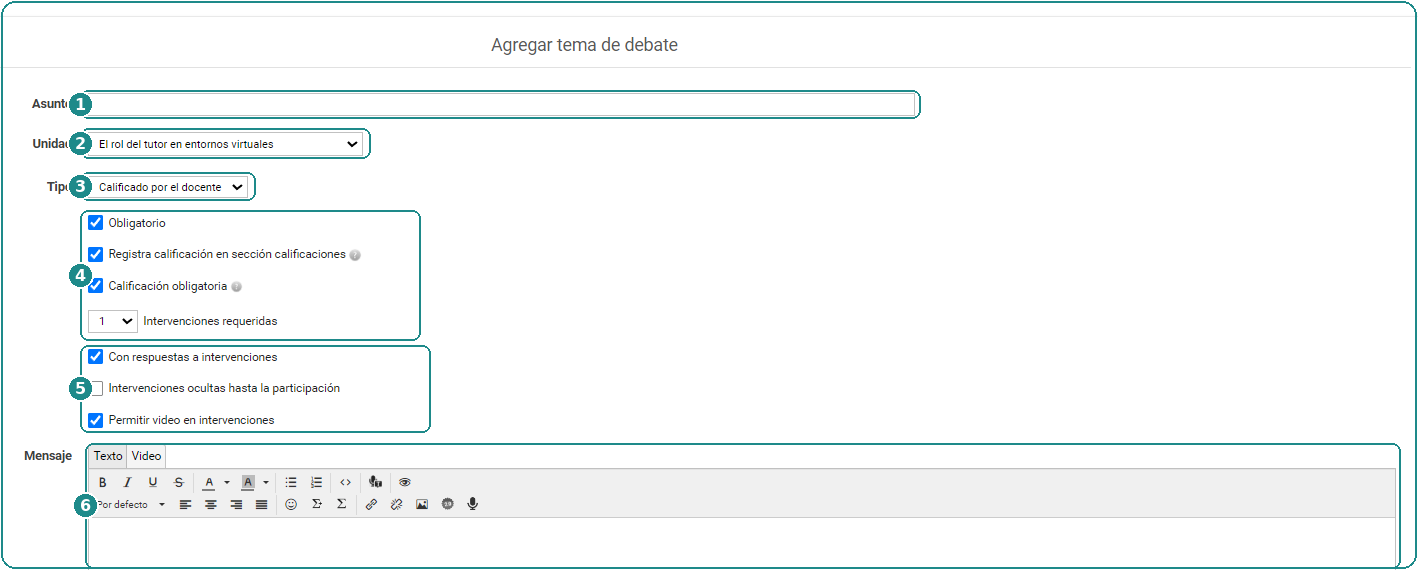
A key point that multiplies the possibilities: every forum and every debate is configured independently. In the same classroom you can set up a diagnostic debate with contributions hidden until participation (each learner answers without seeing the others) and another debate, tied to a class, that is group-based and gradable. There is no single correct way: there are decisions per space, in the service of what each moment of the path needs.
⚠️What does not belong here: assignments
It is not advisable to use these spaces —much less the forum— to request assignment-style submissions: you lose both the point of horizontal work and the tracking of the submission. For those proposals the platform has a specific space, Activities, with its own circuit for submission, grading and feedback.
The eternal forum (and when it isn't)
Here a common mistake shows up. A forum is created for the topic of one class and left open indefinitely, with no one looking at it anymore. The conversation drifts away from its pedagogical moment, late contributions go unread, the thread loses relevance and participation fades. The space stays open, but nothing happens inside it anymore, and a space where nothing happens teaches learners not to come back.
That said, a forum lasting longer than a class is not, in itself, a problem. Courses that meet weekly often need forums open for longer: to think things over calmly, reread classmates, come back and participate again. That possibility of returning is precisely the richness of the asynchronous. What matters is not the duration but the attention: keeping an eye on how the exchange is working and closing it at the agreed time or when the pedagogical need calls for it.
🎲As the old gaming maxim goes: "you have to end the game before it dies". A timely close, with a teacher's summary that gathers up what was built, leaves the memory of a good conversation. A forum that fades out on its own leaves only the feeling of an abandoned place.
One kind of activity among many
One last framing before you decide: an exchange space —forum or debate, either one— is one possible kind of activity in the online setting, by no means the only one. In face-to-face teaching we do not hold debates every single class: we propose them when they suit the stated objectives. The same applies here.
These spaces bring classrooms to life —even more so if you take advantage of the option to participate with short videos, which put a face and a voice to the exchange—, but overusing them and channeling every activity through them wears them out. The platform offers many other options (activities with their submission and feedback circuit, assessments, surveys, workgroups), and there is also everything that can be done outside the campus, linking projects and productions that later come back to the classroom to be shared.
So, which one do I use?
A simple criterion to start with: what belongs to a class and is credited goes into a debate within the Program; what converses and runs across the course —introductions, general questions, the classroom café— goes into forums, with their category and, where appropriate, their time window.
And the final piece of advice: take the time to decide this before you open the space. Moving a conversation that has already started always costs more than thinking it through properly from the outset. Make the choice calmly, looking at the whole design of the course: where you want the word to circulate freely, and where you want it to become gradable learning.
Behind the scenes: how each one is configured
👇 Below, the technical detail of each tool.
Where is it created and who can do it?
Forum topics can be created from the administration as well as from the user view: whichever is more convenient and in keeping with each institution's habits. What enables you to open topics is the private posting permission, which is assigned by profile and is independent of access to the administration: someone can have permission to post forums without ever entering the administration, something very common with assistants. This way, the administrator decides whether only the teaching team opens topics or whether learners can too. Participation, always, takes place in the Forums section of the user view.
Categories: the map of the forum
Each topic lives inside a category, and categories can be general (Café, Questions, Introductions) or linked to the classes: in that case a category is generated per class to group its exchange topics. Note: this linking is purely organizational, it does not activate any tracking; it orders the conversation, it does not grade it. Categories can belong to the classroom or to workgroups.
Creating a topic, step by step
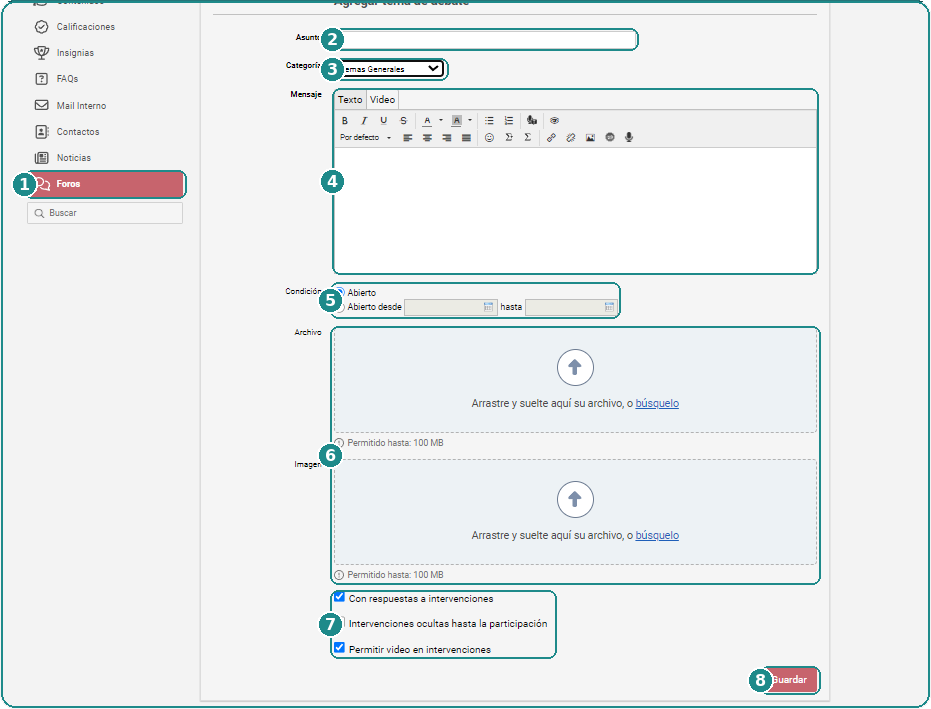
From the ① Forums section, creating a topic asks for the ② subject, the ③ category where it will be organized and the ④ message that opens the conversation, with text and video tabs. The ⑤ condition defines whether the topic stays open or has a from/to time window; you can add a ⑥ file and an image (up to 100 MB each), and the ⑦ properties: replies to contributions (threads), contributions hidden until participation, and video in the replies. ⑧ Save publishes the topic.
The section's configuration
Beyond each topic, the Forums section has its own configuration at the classroom level: email notification of new contributions, the option to attach files in topics, and the window for editing contributions (enabling it between 5 and 15 minutes is recommended: it leaves room to fix things without letting people rewrite the history of the conversation).
Moderating and closing
Whoever moderates can edit and delete contributions, but what is deleted cannot be recovered: when in doubt, it is better to deactivate a category than to delete it. And when closing a topic, a teacher's summary that gathers up what was built shows that the contributions mattered: it is the difference between a close and an abandonment.
educativa Blog · E-learning Best Practices